A paper roadbook is a printed roll, and a PDF roadbook is a picture of that roll on a screen. A digital roadbook in OpenRally format is different: the file itself tells the device the distance of every box, the CAP, the waypoints and their validation radii and the speed zones, with the tulip and note drawings embedded. That is what lets a digital roadbook keep your odometer aligned, validate waypoints and warn you in speed zones.
Digital roadbook vs PDF vs paper: what’s the difference?
Paper and PDF roadbooks show the route as pictures that the rider has to interpret. A digital roadbook in OpenRally format stores the same route as data: every box carries its distance, CAP, waypoint and speed-zone information, with the drawings embedded. That data is what lets the device align your odometer, validate waypoints and alert you in speed zones.
| Paper roll | PDF roadbook on a screen | Digital roadbook (OpenRally file) | |
|---|---|---|---|
| What it is | A printed roll | An image of the printed pages | Structured data (GPX with OpenRally extensions) with the drawings embedded |
| Box distances | Printed | Pixels in an image | A machine-readable value for every box (distance) |
| Waypoints (WPM, WPS…) | A printed symbol | A printed symbol | A typed waypoint with opening and validation radii (open, clear) that the device can validate |
| Speed zones | A printed symbol | A printed symbol | Start, limit and end stored in the data (dz, speed, fz), so speed alerts are possible |
| CAP | Printed | Printed | A value in the data (cap) |
| Odometer alignment | Manual | Manual | Can jump to the box value (in the F2R Roadbook App, a long press on a note’s distance) |
| Scrolling | Wound by hand or by motor | By page or by scroll amount | Box by box |
| Updates | Reprint | Resend the PDF | Resend the file, or update it through RDS |
| Access control | Physical handover | The file can be copied | Not part of OpenRally itself. A delivery platform such as RDS can make roadbooks unsharable and time-limited |
| What reads it | A roadbook holder | Any PDF viewer or app | An OpenRally-capable app or device, such as the F2R Y1000 with the F2R Roadbook App |
Why a PDF isn’t “digital” in the navigation sense
On a screen, a PDF roadbook looks just like paper, but the device can’t read distances, CAP or waypoints from a picture. It can display the page. It can’t validate a waypoint, align the odometer to a box or warn you in a speed zone.
Paper, briefly
Rally roadbooks were traditionally printed on a paper roll and scrolled box by box. Paper is where the format comes from: the same boxes, tulips and notes that a digital roadbook shows today. The difference is that on paper, every number has to be read and matched by the rider.
What is OpenRally?
OpenRally is an open, community standard for exchanging rally roadbook data electronically. It extends GPX, the most common GPS file format, with rally-specific tags (distances, CAP, waypoint types and radii, speed zones, controls) and embeds the tulip and note drawings as PNG or SVG, so one file carries the whole roadbook.
Who created OpenRally
OpenRally was co-founded by ICO Racing and F2R, which defined its initial nomenclature and structure. Dave Peckham of Rally Navigator wrote the specification code. Today it is a community standard maintained by the companies that use it, including roadbook software makers, organisers and device makers.
Why GPX?
The OpenRally README gives three reasons: GPX is the most common geo-mapping file format, it has many existing conversion tools, and it was designed to be extended. OpenRally is an interchange format, so each app is free to store the data internally however it likes.
Versions
The release notes cover v1.0.0, which separated cross-country tags from road rally, removed duplicate tags, set defaults per FIM or current regulations and added tulip and note drawings as base64 PNG or SVG, and v1.0.2, which added the show_coordinates marker. The current schema uses the v1.0.3 namespace (latest tagged release v1.0.2). OpenRally 1.x covers cross-country rally; road rally lives in a separate v0.3-DRAFT branch.
What an OpenRally file includes, and what it doesn’t
An OpenRally file holds the route’s roadbook boxes as GPX waypoints. Each one has its distance, and it can also carry the CAP, a danger level, a waypoint type with its radii, speed-zone and control markers, and the tulip and note drawings. It doesn’t include access control, penalties or scoring rules, maps, or the event’s regulations.
What it includes (per the official schema and example file)
- Header: the units (metric or statute) and the total distance of the route, in the metadata extensions.
- Every box: a GPX waypoint whose extensions hold its distance, the only element every box must have.
- Heading and danger: cap and danger, with danger levels from 1 to 3.
- Waypoints: waypoint types with an opening radius (open), a validation radius (clear) and a name.
- Selective section: start and finish markers (dss and ass).
- Speed zones: start of zone, speed limit and end of zone (dz, speed and fz).
- Transfers: start and end of a transfer section (dt and ft).
- Controls and markers: stop, neutralisation and its end (neutralization and fn), time control with the minutes allowed to the next one (timecontrol), checkpoint, fuel and odometer reset.
- Safety assets and the show_coordinates marker.
- Drawings: the tulip and notes images.
Standard GPX elements also apply, such as each waypoint’s latitude and longitude. Whether a file also carries the full track depends on the editor’s export settings.
What it doesn’t include (the v1.x schema has no element for)
- Who may open the file, or for how long. Delivery platforms handle access control (RDS, for example, offers unsharable roadbooks and time-limited access).
- Penalties, scoring rules or the event’s regulations. The only timing element is timecontrol allowed, the minutes to the next control.
- The FIM or FIA symbol lexicon. Drawings are embedded images, not symbol codes.
- Maps or map tiles.
- Notes as searchable text. Notes are drawings, although an SVG drawing can contain text.
- A digital signature or integrity check.
- Rules for how a device should behave. The schema stores radii and markers; each device decides how to display them and validate against them.
OpenRally tags and attributes (reference)
OpenRally tags live inside the standard GPX extensions block of each waypoint (wpt), in the namespace http://www.openrally.org/xmlschemas/GpxExtensions/v1.0.3, usually with the prefix openrally.
| Tag | Value / attributes | What the spec or example says |
|---|---|---|
units | metric or statute | Metric: route distances in km, speeds in km/h, waypoint radii in metres. Statute: miles, mph and yards. |
distance | Decimal, zero or more | In the metadata: total route distance. In a waypoint: the box’s distance (every waypoint must have one). |
cap | Integer from 0 to 360 | Heading (CAP). |
danger | 1, 2 or 3 | Danger level: ! / !! / !!! |
dss, ass | Waypoint type: name, open, clear | Start and finish of the selective section. |
dz, fz | Waypoint type | Start and end of a speed zone. |
speed | Positive integer | Speed limit, used with dz. |
wpm, wpe, wps, wpc, wpv, wpp, wpn | Waypoint type: name (text), open and clear (positive integers, radii in the file’s units) | Waypoint types. The schema comments expand WPM (masked), WPE (eclipse) and WPS (safety); WPV was added later in the project history. |
checkpoint | Waypoint type | Checkpoint. |
stop | Seconds, integer, default 0 | Stop (the example uses a short stop at a road crossing). |
neutralization | Seconds | Neutralisation (the example uses a fuel stop). The schema flags it to be renamed sn at the next major version. |
fn | Waypoint type | End of neutralisation. |
timecontrol | Attribute: allowed (integer) | Time control. allowed = minutes from this time control to the next. |
fuel | Empty marker | Fuel. |
reset | Decimal, default 0 | Odometer reset, to the value given. |
show_coordinates | Empty marker | Tells the reader it may show this waypoint’s GPS coordinates to competitors (v1.0.2). |
dt, ft | Waypoint type | Start and end of a transfer section. |
tulip, notes | Drawing: base64 PNG data URL or inline SVG, ideally in CDATA. Attributes: href and id | Tulip and notes drawings. SVG should not reference external files, because the file must work on its own and offline. |
medical, helicopter, police, fire, spectators, media | Empty markers | Safety tags, mainly used in an organiser’s mapping and tracking to locate assets on the course. |
- Units spelling: the schema comment says “statute”, but its list of allowed values spells it “statue”. Accept both when you read files.
- Older names: a few older tag names were replaced in v1.0 and are commented out in the schema. Don’t treat them as current.
- Vendor extras: some editors add non-standard attributes or modes on top of the spec. Readers should ignore unknown tags and attributes.
How to get an OpenRally roadbook file
You get an OpenRally file in one of three ways: the organiser sends it (as a download or email, or assigned to your device through a delivery platform such as RDS), you download one from a roadbook library, or you make your own in a roadbook editor that exports OpenRally GPX.
From the organiser
Some organisers send the file directly. Others deliver it through a platform. With RDS (Roadbook Delivery System, developed and run by TerraPirata), organisers import roadbooks, for example from Rally Navigator, or OpenRally files (GPX), assign them to riders by Device ID or email, and can set time windows, speed zones, live tracking and scoring. Competition roadbooks are often time-limited or non-shareable by design.
From a library
TerraPirata offers RDS users a free library of partner roadbooks. In the F2R Roadbook App, these appear under “Public”.
Make your own
These roadbook editors have a verified OpenRally export:
- Rally Navigator: File > Export > OpenRally GPX. Rally Navigator also publishes sample OpenRally GPX files.
- RiverNotes 2: lists OpenRally among its export formats.
- Tulip: exports OpenRally v1.0.2, with a Strict mode and an Undocumented mode.
Can I convert a PDF to OpenRally?
For developers: how to build a tool or viewer that reads OpenRally
For developers
An OpenRally file is GPX 1.1 XML. Parse each waypoint, read the OpenRally elements inside its extensions, keep the boxes in file order, compute the partial distance between boxes, and render the tulip and notes images next to the distances, CAP and markers.
Steps
- Check the OpenRally namespace version in the file root and parse according to it. The README asks for this, and the project uses semantic versioning.
- Read the units and the total distance from the metadata extensions.
- For each waypoint (wpt), read the latitude and longitude, the total distance and the partial distance (this box minus the previous one, minding any reset), plus cap, danger and the waypoint, zone and control markers with their open, clear and name attributes.
- Render the drawings. The content is either a base64 PNG data URL or inline SVG, normally in CDATA. Never fetch external references: the file is designed to work offline.
- Validate during development with the repository’s validate.sh script, which runs xmllint against test_wrapper.xsd (this imports openrally.xsd and gpx-strict.xsd).
- Be lenient: skip XML comments and other vendors’ extensions, ignore unknown tags, and accept both “statute” and “statue”.
- Keep navigation logic in the app, not in the file: odometer from GPS, alignment to the box distance, opening a waypoint inside its open radius and validating it inside its clear radius, and speed-zone alerts between dz and fz.
Sample: read the boxes with the Python standard library
import xml.etree.ElementTree as ET
GPX = "{http://www.topografix.com/GPX/1/1}"

def read_openrally(path):
    root = ET.parse(path).getroot()
    boxes, prev = [], 0.0
    for wpt in root.findall(GPX + "wpt"):
        ext = wpt.find(GPX + "extensions")
        if ext is None:
            continue
        box = {"lat": float(wpt.get("lat")), "lon": float(wpt.get("lon"))}
        for el in ext:
            if not isinstance(el.tag, str) or "openrally" not in el.tag:
                continue  # skip comments and other vendors' extensions
            tag = el.tag.split("}")[1]          # e.g. "distance", "wpm", "tulip"
            box[tag] = dict(el.attrib) if el.attrib else (el.text or "").strip()
        total = float(box.get("distance", prev))  # total distance from start
        box["partial"] = round(total - prev, 2)   # distance since previous box
        prev = total
        boxes.append(box)
    return boxes
The official example.gpx is a tag showcase, not a real route, so its distances aren’t a real sequence. Test with a real export, such as one of Rally Navigator’s sample OpenRally GPX files. In a browser, a viewer can do the same with DOMParser and getElementsByTagNameNS, and show PNG tulips in an img element with a data URL.
Resources
- OpenRally repository (README, release notes and mailing list)
- Cross-country XSD
- example.gpx
- validate.sh
- Road rally draft (v0.3-DRAFT)
- GPX 1.1 schema (Topografix)
- Rally Navigator cross-country guide
- Tulip’s OpenRally export notes
Loading an OpenRally file on the F2R Y1000 (F2R Roadbook App)
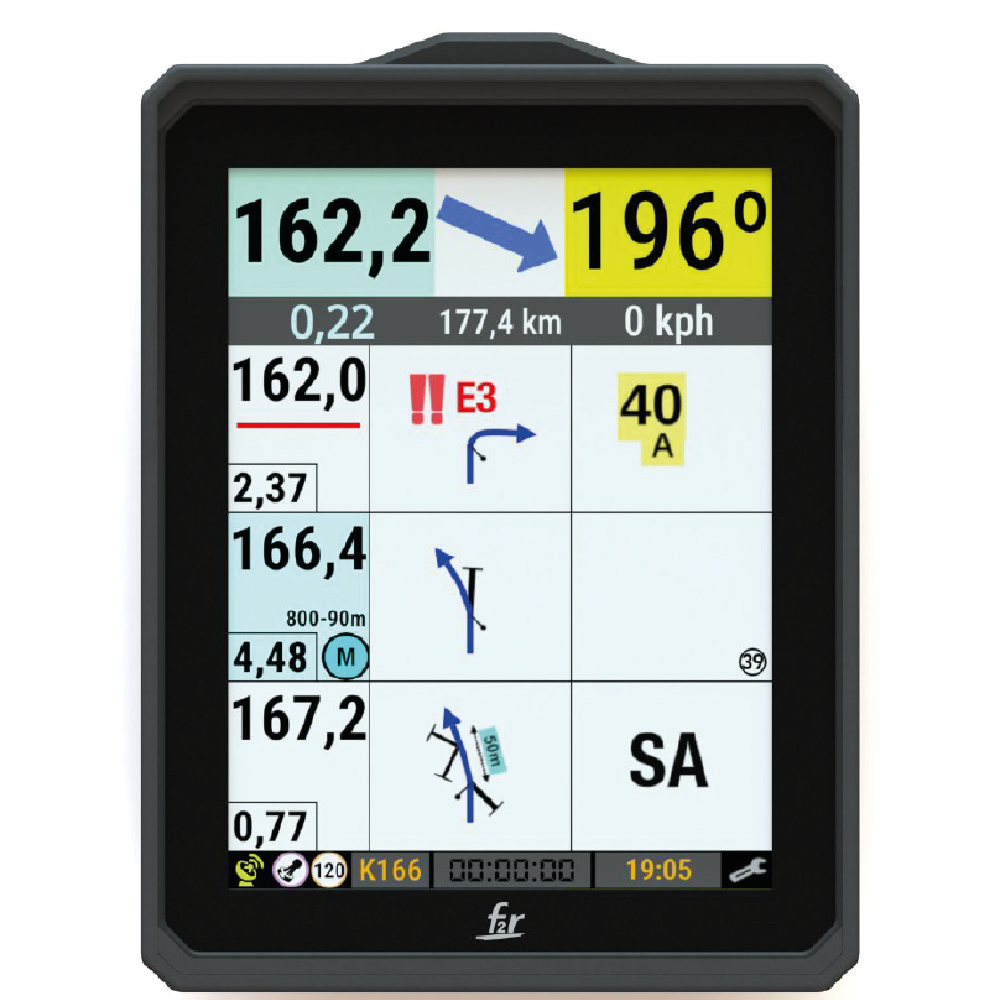
The F2R Roadbook App on the Y1000 reads OpenRally .GPX files and supports every OpenRally tag. Import a file from local storage, or receive it through RDS assigned to your Device ID or account. The app then gives you odometers, CAP, speed-zone alerts and waypoint validation from the file’s own data.
From a local file
- In the F2R Roadbook App, tap ADD.
- Pick the .GPX file from Downloads, Files, email, Google Drive, Dropbox or any other folder.
- The roadbook appears under “My Roadbooks”. You can delete locally loaded roadbooks in the app.
Through RDS
- Create an account or log in at rds.terrapirata.com.
- Link the Y1000 with its Device ID, shown in the MyGamma app, or with the Google account email used on the device.
- The organiser, or you, assigns roadbooks. They appear under “Events” for the period the owner sets, or under “Public”.
Only the owner can manage RDS roadbooks, from RDS. Roadbooks shared to a Device ID only show on that device; the Device ID is fixed, while the email can be changed.
What the app does with the data
- Main and secondary odometers, adjusted by long press, by a long press on a note’s distance, or with the DR001 (moto) and DRA01 (car) remotes. The Y1000 has virtual tripmasters built in.
- CAP heading.
- A waypoint arrow that opens inside the waypoint’s opening radius and closes when the waypoint is validated or you leave the radius.
- Distance to the waypoint and the next waypoint’s name, which blinks green during validation.
- A waypoint table showing validated or missed status, with times.
- Speedometer colours in speed zones: inside the limit, approaching it or over it.
- Stage time from DSS to ASS validation.
- The FIM lexicon on long press.
- “Go to note” in a GPS app when the roadbook includes coordinates.
And PDFs?
The Y1000 is a full Android device, so a PDF roadbook can be read with a compatible third-party app from Google Play; the Y1000 User Guide names Rally Roadbook Reader by Rally Navigator as an example. The navigation features above need an OpenRally file.
FAQ
What’s the difference between a PDF roadbook and an OpenRally roadbook?
A PDF is an image of the printed pages, so the device can’t read distances or waypoints from it. An OpenRally file stores each box’s distance, CAP, waypoint type and radii and speed zones as data, with the drawings embedded. That lets a digital roadbook align the odometer, validate waypoints and give speed-zone alerts.
What is OpenRally?
OpenRally is an open community standard for exchanging rally roadbook data. It extends GPX with rally tags and embeds the tulip and note drawings. It was co-founded by ICO Racing and F2R, which defined its initial nomenclature and structure, and Dave Peckham of Rally Navigator wrote the specification. Today the companies that use it maintain it.
Which editors export OpenRally files?
Rally Navigator (OpenRally GPX export), RiverNotes 2 and Tulip (OpenRally v1.0.2), among others. Organisers can also deliver OpenRally files to riders through platforms such as RDS, assigned to a Device ID or an email account.
Can I use a PDF roadbook on the F2R Y1000?
Yes, with a compatible third-party app from Google Play, because the Y1000 is a full Android device. The F2R Roadbook App itself reads OpenRally files (.GPX) and can’t convert PDFs, so waypoint validation and speed-zone alerts need an OpenRally file. A PDF alone isn’t enough to build one, because it has no waypoint coordinates and no track; if you also have them (for example as GPX), F2R may be able to prepare an OpenRally file for you as a courtesy, subject to confirmation. To ask, contact F2R.
How do I load a roadbook on the Y1000?
In the F2R Roadbook App, tap ADD and pick the .GPX file from local storage, email or cloud folders. Or receive it through RDS, assigned to your Device ID (shown in MyGamma) or to your account. Roadbooks then appear under My Roadbooks, Events or Public.
Does the F2R Y1000 read every OpenRally tag?
Yes. The F2R Roadbook App on the Y1000 reads all OpenRally tags, from distances, CAP and danger levels to waypoints with their radii, speed zones, controls, transfers and the embedded tulip and note drawings.
Does an OpenRally file include penalties or access control?
No. The schema has no elements for penalties, scoring rules or who may open the file. Access and time limits are handled by delivery platforms such as RDS, which can make roadbooks unsharable and available only for a set period.
Is OpenRally only for cross-country?
OpenRally 1.x targets cross-country rally. Road rally is covered by a separate draft (v0.3-DRAFT) in the same repository, so cross-country users should follow the current 1.x schema.


